
Rouge Casino on a handset — your slot reels, your cashier, your support widget, all reachable through Safari or Chrome without a single download.
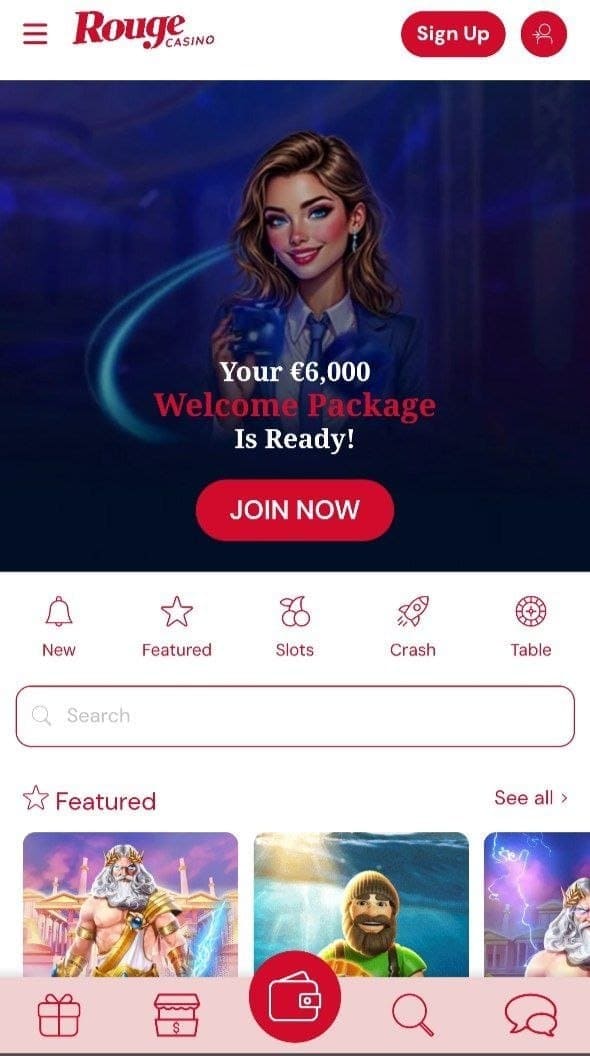
Handset access at this brand runs through one delivery layer alone — the responsive HTML5 site served via Safari, Chrome or any modern mobile browser engine. Apple's App Store and Google Play both restrict real-money casino downloads across the British market, which leaves the operator following the standard offshore-market pattern of skipping a native binary entirely. We loaded the lobby across recent iOS plus mid-range Android handsets during our review window; the experience renders identically across both device families, with no functional gaps versus a desktop session.
Coverage below tracks the practical workflow: opening the lobby cleanly, adding a home-screen shortcut for app-like behaviour, performance under variable mobile signal, security considerations around any third-party APK file that may surface through operator-adjacent channels, plus the cashier and KYC flow on a small screen. Every observation reflects browser-based testing against the brand's UK-targeted property.
| Access Path | How It Works | Best Suited For |
|---|---|---|
| 🌐 Direct Browser Session | Launch Safari, Chrome, Firefox or Edge and head straight to the brand URL — no installation step required | Casual players, infrequent visitors, anyone preferring not to add storage commitments |
| 🏠 lobby-bookmark icon | Add a bookmark through the share menu · the lobby opens with one tap inside a dedicated tab | Regular session players wanting fast access without a full installation footprint |
| 📱 Progressive Web App (Android Chrome) | Where PWA-compatible markers are present, "Install" surfaces alongside the standard add-to-home option | Android users seeking near-app behaviour without enabling sideload permissions |
Worth flagging up front: we did not encounter a verifiable native binary distributed through brand-adjacent channels for this brand during the period we examined. Where any reader does come across a unofficial APK file claiming to deliver Playing Rouge Casino across Android, the security exposure attached to sideload installations across the offshore segment is substantial — keyloggers, credential harvesters, plus modified clients designed to redirect deposit traffic all surface inside that distribution ecosystem. Our recommendation is to skip every such file and use the browser route instead.
This delivers app-adjacent behaviour without invoking any installation step. Tapping the icon opens the cashier with a single press. Safari handles session-cookie persistence, KYC document uploads via the device camera, plus streamed-room audio routing through standard mobile output without anything extra required. The browser address bar remains visible along the top of the screen — that thin strip of chrome is the principal visual difference compared with a standalone application window.
Where your browser detects progressive-web-app signals, the "the relevant Chrome menu option" choice may shift to "Install" instead. Selecting that option packages the experience through Android's WebAPK framework, producing something closer to a real binary — a dedicated task-switcher entry, separate storage allocation, plus a standalone window that hides browser interface elements. Compared against sideloading any sideloaded APK file file, this approach skips the "unknown sources" security toggle entirely because nothing installs outside Chrome's own sandbox environment.
Should an APK file surface via channels linked to the operator distribution channels for this brand, the security trade-off deserves a clear treatment. Files distributed outside the official marketplaces — even when the apparent source looks legitimate — carry real risk across the offshore-gambling segment. Repackaged binaries containing credential-harvesting payloads, modified clients redirecting deposits toward attacker-controlled wallets, alongside keyloggers attaching to other applications on the same handset have all surfaced repeatedly across this distribution category.
Our straightforward recommendation: ignore any a non-marketplace binary ostensibly carrying this brand. The browser-plus-shortcut route described above delivers identical lobby behaviour without enabling sideload permissions on your handset. Readers who feel comfortable verifying APK signatures, cross-checking SHA-256 hashes against operator publications, plus configuring per-app permission scopes can make their own informed call — but for everyone else, skip the binary, take the browser path, add a shortcut to your home screen.
| Element | Desktop Behaviour | Handset Behaviour |
|---|---|---|
| Lobby Layout | Grid of game tiles · sidebar filters visible · multi-column structure | Single-column scroll · filter panel collapses behind a tap-to-expand trigger |
| Navigation Menu | Persistent top bar with every section visible | Hamburger menu hides sections until tapped open |
| Game Search | Search field visible across header · keyword filtering instant | Search opens after tapping a magnifier icon · behaviour identical once active |
| Live Dealer Streams | Side-by-side video and controls layout · landscape orientation natural | Stacked layout in portrait · landscape recommended for the same side-by-side feel |
| Cashier Forms | Multi-column input fields · keyboard shortcuts speed entry | Stacked input fields · on-screen keyboard occasionally covers the confirm button until "done" is tapped first |
| Chat Widget | Floating bubble fixed to the lower-right corner | Same widget with a slightly smaller footprint to avoid obscuring game controls |
| Slot Auto-Play | Long-session auto-spin handled cleanly across browser tabs | Same mechanic operates · backgrounding the tab may pause spins on some Android browsers |
Loading the home page cold across a 4G LTE connection typically resolved inside three to four seconds across the sessions we tested. Streamed Vivo rooms demanded more bandwidth headroom — smooth rendering held above roughly 5 Mbps downlink, with occasional buffering hiccups across weaker signal patches. Wi-Fi sessions handled everything without complaint, including extended baccarat runs at full quality.
Battery consumption runs at typical levels for an extended browser session involving live video — figure roughly 12–18% per hour of active streamed play on a recent flagship handset. Older devices burn through power faster. Closing background applications plus dimming the display extends the effective play window if you plan longer stretches across a single charge.
Pure slot play sits light on bandwidth — roughly 50–100 MB per hour, well inside most monthly mobile allowances. Streamed-room sessions change the picture meaningfully: figure 400–800 megabytes per hour at standard quality. Readers operating on capped data plans should monitor consumption or restrict live tables to Wi-Fi sessions where possible.
Audio mixing through Bluetooth headphones works reliably across both platforms during streamed play, although we observed occasional latency drift across game-show formats. Switching to wired earbuds eliminates the variance entirely if you find the lag bothersome.
Password recovery flows through an email-based reset link. Tapping "Forgot password" triggers a message sent to the address on file. We recommend storing credentials inside a reputable password manager (Bitwarden, 1Password, iCloud Keychain or equivalent) rather than relying on memory or browser autocomplete — gambling-account logins remain a high-value target for phishing operators across the wider web.
Browser-first works. Functional parity with the desktop session sits at effectively 100% — every feature reachable from a laptop turns up on a handset, including cashier flows, KYC uploads, streamed-room access, welcome-bonus activation, plus the self-service responsible-gambling toggles. Absence of a native application costs a small amount of polish — slightly more vertical space lost to browser chrome, no push notifications, occasional keyboard overlap quirks — but nothing structural disappears.
For British readers used to UKGC-licensed mobile apps with their slicker onboarding plus integrated GamStop hooks, the experience here will feel less refined. Underlying gameplay remains identical because the studios shipping games — NetEnt, Play'n GO, Yggdrasil, Hacksaw — push the same HTML5 builds across every venue that licenses their catalogues. What differs sits in the wrapper around those games, and that wrapper is functional rather than premium here.
Neither marketplace lists a real-money casino binary from this brand. Apple's App Store plus Google Play both restrict downloads of this category across the British market. Should any the unofficial installer file appear claiming to deliver Accessing Rouge Casino through Android, we recommend ignoring it entirely — the responsive site delivers identical functionality without the security exposure attached to sideloaded files.
Where PWA flags are detected by the browser, yes — the "Install" option surfaces alongside the standard "the iOS share-sheet option labelled "the pin-to-launcher choice Screen"" choice on Android Chrome. Behaviour varies by browser version, so the more reliable path for most British readers remains the regular browser-icon entry, which delivers most of the same benefit without depending on PWA support specifically.
Yes — slot releases, streamed Vivo rooms, table games, plus specialty content all render through the responsive layout. Live dealer presentations show minor layout differences versus desktop (stream above controls in portrait rather than parallel-pane), although functional access stays complete.
Roughly 400–800 MB hourly at standard quality across Vivo rooms. Slot-only sessions sit far lighter at 50–100 MB across each hour. Readers on capped data plans should restrict streamed tables to Wi-Fi where possible.
Yes — the browser-based deposit area opens the handset camera lens or photo library when document submission is required. Capturing the image at the moment of upload usually yields cleaner results than transferring scans from a laptop, because lighting and orientation are easier to control with a handheld device.
RNG slot outcomes resolve server-side, so the spin completes regardless of whether your device stays connected. Reopening the lobby restores the session and credits any wins. Streamed rounds resolve based on the dealer's actual outcome at the table; you receive whatever the round delivered, win or loss, once reconnection occurs.
Where the option is enabled on the account, yes — the same 2FA challenge applies on a phone as on desktop. Turning it on is worth doing if available, particularly for any account holding a meaningful balance.
Across the testing interval we did not see device-segmented promotions specific to handset users. The welcome architecture, reload campaigns plus loyalty mechanics all apply identically regardless of access method. That could shift with future campaigns, so check the promotions tab inside your account before depositing.
Yes — the bonus code field plus the opt-in checkbox both surface inside the in-browser funding interface during a qualifying first deposit. Enter BIENVENUE1 before confirming the transaction, leave the promotion checkbox ticked, and the match credit plus the 100 free spins on Narcos process the same way they would on a desktop session.
Effectively no. Safari on iOS and Chrome on Android both render the lobby identically. Minor differences appear at the OS layer — share-sheet behaviour for adding shortcuts, PWA install support on Android only, plus subtle font rendering variations — but none affect gameplay, cashier flow or support access.